
- The Companies House register does not let you search shareholders directly. Shareholder names sit inside filed documents – the confirmation statement and the incorporation record – which anyone can download for free from a company’s filing history.
- Shareholders are the actual owners of a limited company, often reflecting its values, stability, and direction as follows:
- Analysing shareholder data helps you understand a company’s structure and financial backing, offering insights into its stability.
- Checking for legal issues linked to shareholders can reveal potential risks or reputational concerns for the company.
- Understanding shareholder networks uncovers strategic connections, partnerships, or possible conflicts of interest.
Who is a Shareholder of a Company?
A shareholder is any individual, company, or institution that owns at least one share in a company limited by shares. Shareholders play a crucial role by providing financial backing, which supports the company’s operations and growth.
In return for their investment, shareholders may receive a share of the company’s profits through dividends. They also have certain responsibilities, including overseeing the conduct of directors and ensuring the company is managed in its best interest.
Additionally, shareholders have voting rights on key business decisions, allowing them to influence the company’s strategic direction. Their level of control depends on the percentage of shares they own, with majority shareholders having greater decision-making power.
What Shareholder Information is Available on Companies House?
Companies House publishes the following about a company’s directors and persons with significant control – which is how you identify a shareholder who also holds one of those roles:
- Full Name of the shareholder.
- Month and Year of Birth (if applicable).
- Other Positions Held within the company, such as Director or Person with Significant Control (PSC).
- Involvement in Other Companies, including current, active, or dissolved businesses.
- Service address listed for official communications.
A confirmation statement filed with no updates repeats the existing information. One filed ‘with updates’ can report changes to the statement of capital, share trading status, and shareholder information – which is where the shareholder detail appears.
To conduct a deeper investigation into a shareholder, search for their name under Company Officers. If the individual is also listed as a company officer, you may find their correspondence address or details about their shareholding in a public company.
This search can also reveal former names, birth details, and occupation, offering valuable insights into their background, business activities, and level of influence within the company.
If the shareholder is a company rather than a person, the confirmation statement names that company – search it on the register in turn to find its own directors, PSCs and filings. Where the PSC panel and the shareholder list disagree, the PSC panel shows control (more than 25% of the shares or voting rights); the confirmation statement shows the full share split.
How Do I Use the Register For Search For Company Shareholders on the Public Register?
You can find shareholder information on Companies House by searching by the shareholder or the private company name. If you would rather not work through the raw register, our free Company Check returns the company profile, its directors, and its persons with significant control in one search, and links straight to the filing history you need for the share split.
1. Search by Shareholder Name
If you want to look up a specific shareholder, enter their name in the Companies House search bar.
- Shareholders are not indexed as a searchable category on the Companies House register.
- Searching a person’s name returns records such as company officers, Persons with Significant Control (PSCs), and disqualified directors, which can help you identify the company they are connected to.
- Once you identify the correct company, open its Filing History and review the confirmation statement or incorporation record to find the shareholder names and share split.
This method allows you to verify an individual’s involvement in multiple businesses and their level of control within a company.
2. Search by Company Name
If you want to find all company shareholders, searching by company name is the best approach.
- Enter the company’s name in the Companies House search bar.
- Click on the correct company from the search results.
- Select ‘Filing History’ to view official company records.
- Open the most recent ‘Confirmation Statement’ (if available).
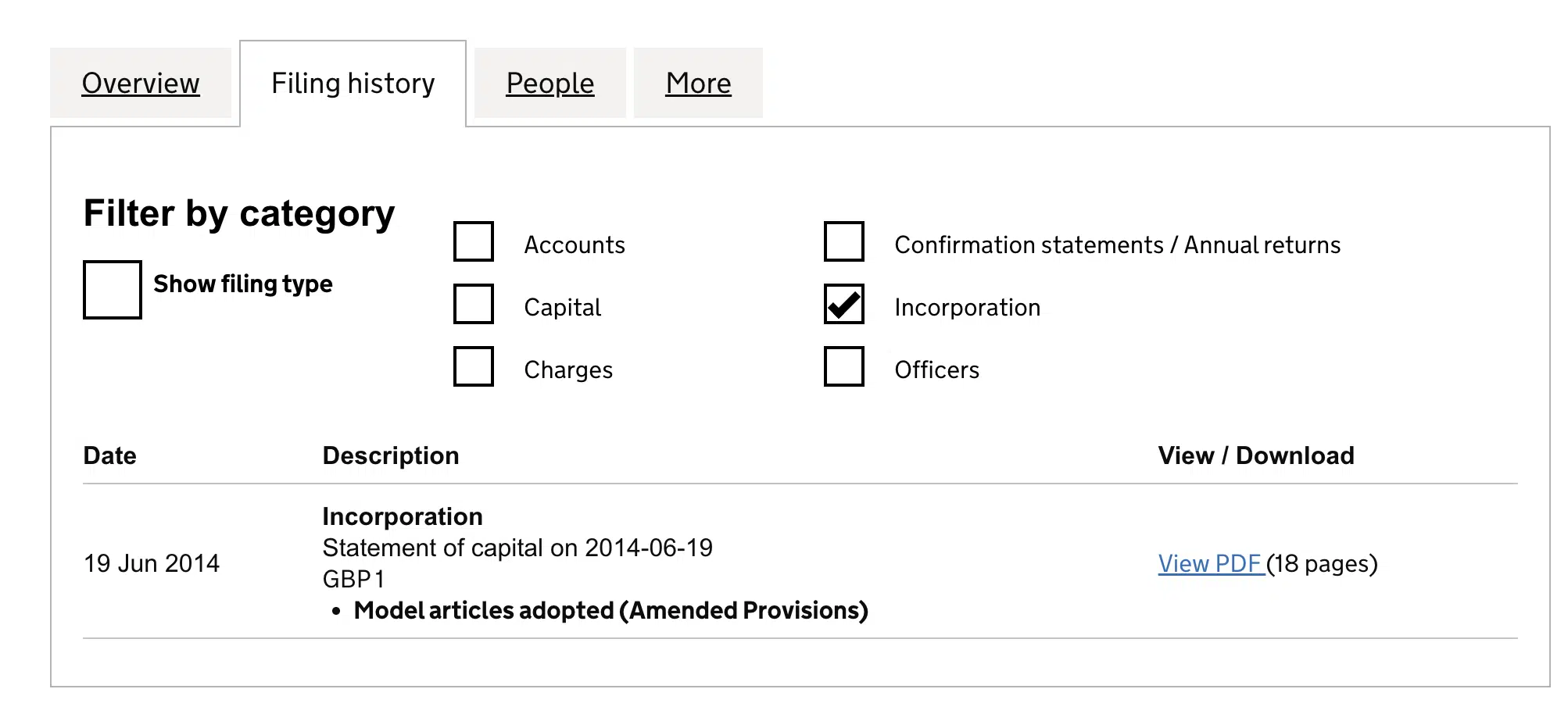
As you review the confirmation statements, start with the earliest available version marked “with updates” and then examine subsequent updated versions to track changes in ownership over time.
Scroll through the document until you find ‘Full Details of Shareholders’, usually near the end, after the statement of capital. Here, you can determine the shareholders’ names, the number of shares held and the share class, and by comparing statements from different years, how the holdings changed.
If the confirmation statements do not include shareholder details, check the ‘Incorporation’ records instead. This section contains shareholder information from when the company was first registered.
To find these details:
- Go to the filing history on Companies House.
- Select ‘Incorporation’ to view all relevant company incorporation records filed during the company formation process.
- Review the documents to see the shareholding structure at the time of incorporation, including the initial shareholders and their share allocations.
Between confirmation statements, there may be shareholding details that have not yet been updated. In such cases, the company’s register of members is the most reliable source of information.
The register of members is kept by the company, not by Companies House, but it is not private: a member can inspect it free of charge, and anyone else can ask in writing to inspect it or have a copy on payment of the prescribed fee, stating who they are and what the information is for. It is typically kept at the registered office address or a Single Alternative Inspection Location (SAIL), where it can be inspected on request.
Here is an example using Your Company Formations Ltd. Search for YOUR COMPANY FORMATIONS LTD on the Companies House register and open company number 09094616. From the company page, select Filing history to see the documents the company has filed.
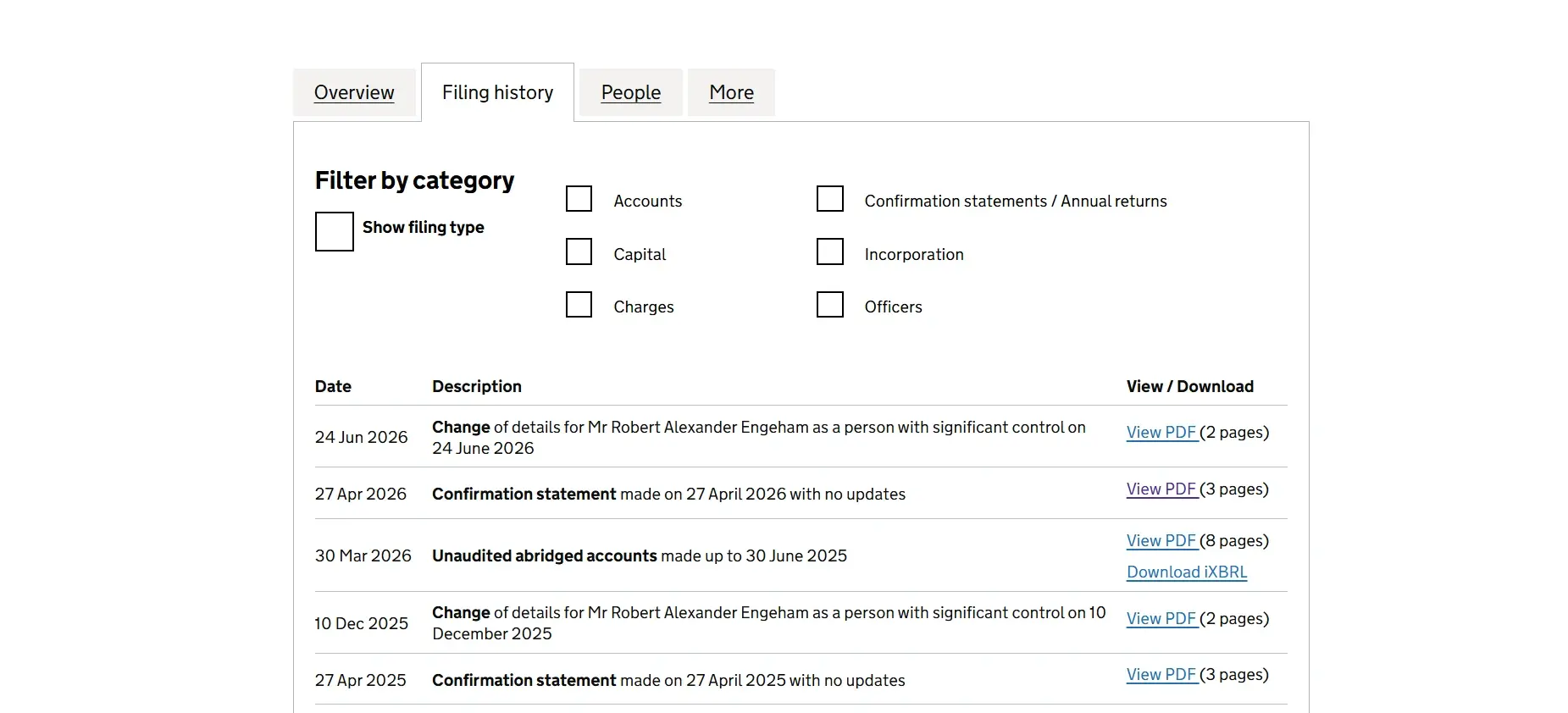
The latest confirmation statement, made on 27 April 2026, was filed with no updates. To see the shareholder information, go back through the filing history and open the most recent confirmation statement filed with updates, made on 23 May 2018.
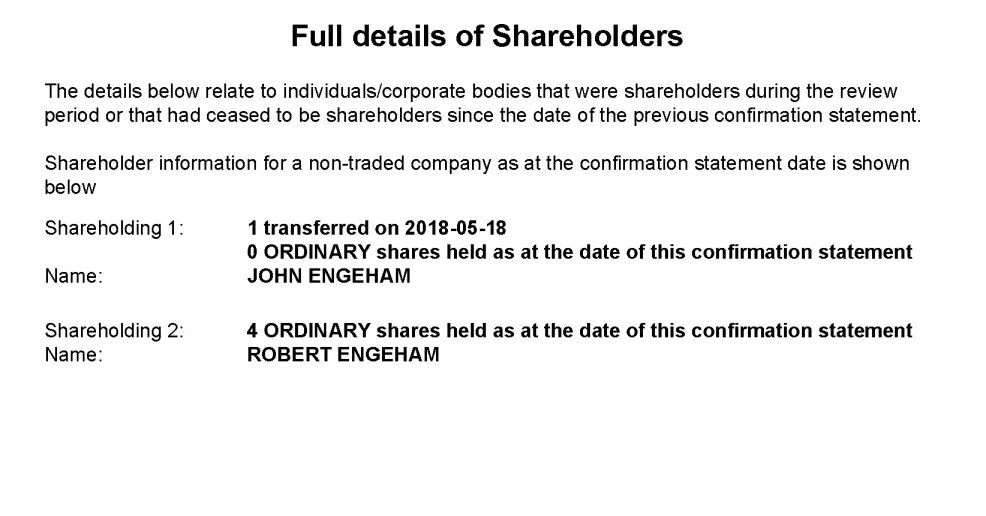
Open the PDF and look for the shareholder information towards the end of the document. This shows the shareholder name and the shares recorded for them. It also demonstrates why you may need to check an earlier confirmation statement when the latest one was filed with no updates.
Can I Use a Company Name to Get Shareholding Information?
Yes, you can use a company name to find shareholding information, track ownership changes, and the company’s financial structure. Follow these steps:
- Go to the Companies House search tool.
- Enter the company name of interest in the search bar.
- Verify the correct company from the search results by checking the registered office address or other known details.
- Navigate to the “People” section to view directors and Persons with Significant Control (PSC).
- The “Filing History” section provides access to confirmation statements and other relevant documents that provide details about shareholding.
- Open and review confirmation statements marked “with updates” to see changes in the shareholding structure.
What Shareholding Insights and Company Information Can I Get From a Confirmation Statement?
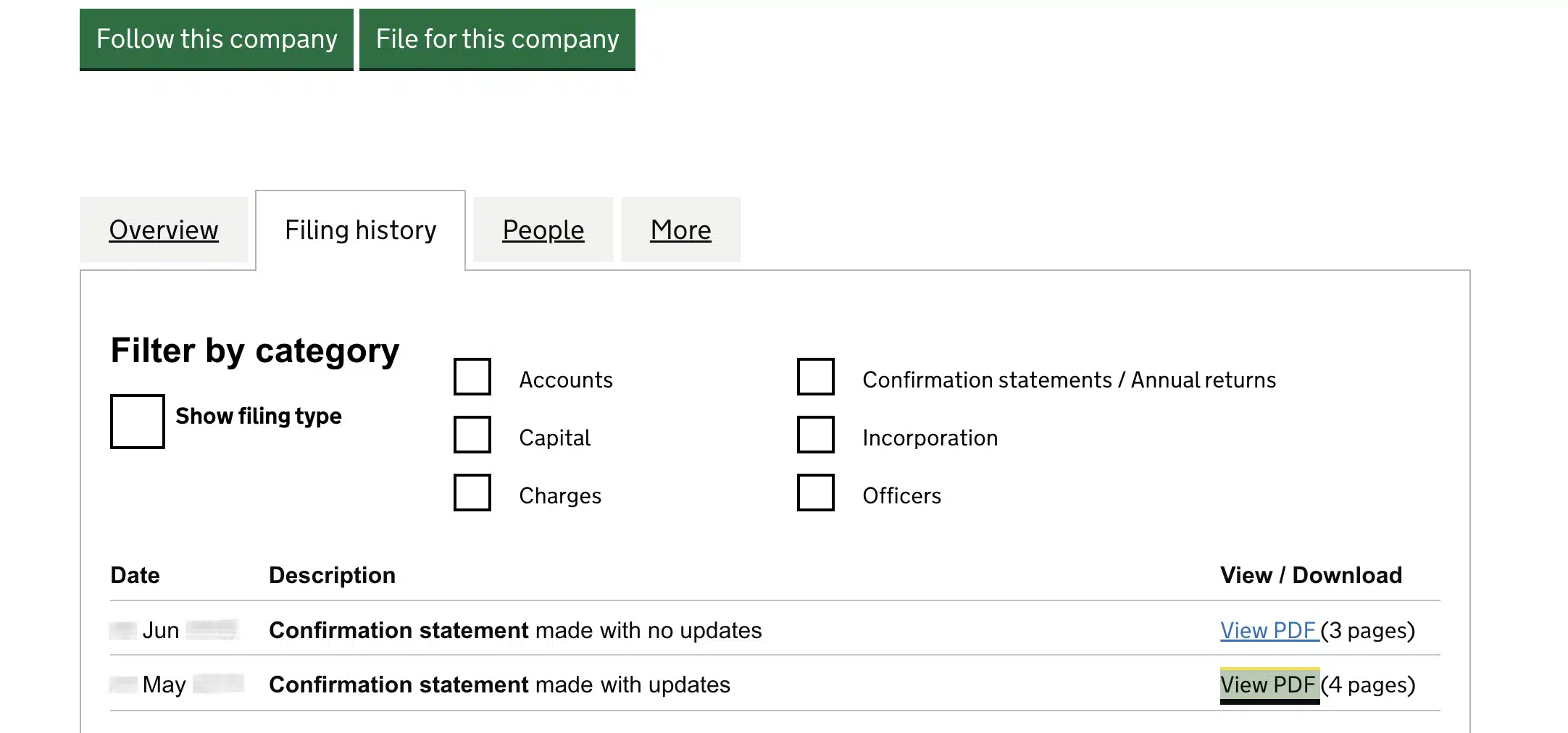
A confirmation statement confirms that the information Companies House holds about the company is up to date. It also requires the company to state that its intended future activities are lawful. Many confirmation statements are filed with no updates, meaning nothing changed since the last one.
However, when you find a confirmation statement marked “with updates,” scroll through it to determine if the reported changes involve the shareholding structure. If they do, you can obtain the following insights:
- Details of new shareholders, including their names and the number and class of shares acquired.
- Changes in existing shareholdings include an increase or reduction in shares, changes in share class, and adjustments to the number of shares held.
If you are on the other side of this – the shareholder list Companies House holds for your own company is out of date – the confirmation statement is the filing that corrects it, and our confirmation statement filing service prepares and submits the CS01 for £90 plus VAT, including the £50 Companies House filing fee.
Once you have identified shareholders, you can conduct a director search to gather further business intelligence:
- Other companies where the shareholders are directors or Persons with Significant Control (PSC) and the stakes they hold in those companies.
- Those associated businesses’ reputation and financial performance help assess the shareholders’ credibility.
- Those companies’ industries and commercial activities provide insights into the shareholders’ expertise and business interests.
- Verify the shareholder’s reputation by checking their name in the Disqualified Directors Register, which can indicate past misconduct or legal issues.
You can assess ownership influence, track financial stability, and uncover potential business connections by analysing these details.
Companies House aims to balance transparency with shareholder privacy by making key company information publicly accessible while protecting sensitive personal details.
As a result, a shareholder’s personal information, such as home address and full date of birth, is not disclosed in the Companies House register.
If you are checking who owns a company you are about to deal with, run it through Company Check first and open the filed confirmation statement only when you need the exact share split.
| Company Check (free) | Search the register yourself | Our confirmation statement filing | |
|---|---|---|---|
| Cost | Free, no login, no data stored. | Free. Companies House makes all its public company data available at no charge and you do not need to register. | £90 plus VAT, including the £50 Companies House digital filing fee. |
| What you get | Status, registered address, company type, SIC code, incorporation date, directors, persons with significant control, outstanding charges and the last five filings, in one profile. | The same data spread across the company overview, the People tab, the charges tab and the filing history, one page at a time. | A filed CS01 that updates the SIC codes, statement of capital, share trading status and shareholder information Companies House holds for your own company. |
| Who owns the shares | Control at PSC level (more than 25% of the shares or voting rights), with a link to the filing history for the named share split. | You open the filing history and read the confirmation statement or incorporation record yourself. | Not a lookup. This is how a company corrects its own shareholder record. |
| Time | Seconds. | Depends on how many filings you need to open. | Filed within 14 days after the company’s review period ends. |
| Who it suits | Anyone about to sign, pay or meet, who wants the whole picture on one screen. | Anyone happy to work through PDFs on the register. | A company that wants its CS01 handled rather than filing it itself. |
| Run a free Company Check | See the filing service |





Your email address will not be published. Required fields are marked *