- Use HMRC’s free checker at gov.uk/check-uk-vat-number to check any UK VAT number online and get the business name and address.
- VAT registration becomes required when your taxable turnover for the last 12 months goes over £90,000 (up from £85,000 in April 2024). You must register within 30 days of the end of the month in which you went over it, or by the end of the 30 days in which you realise your turnover will go over it.
- UK businesses must use HMRC systems for UK VAT numbers and EU VIES for European checks since January 2021.
- Check supplier VAT numbers before working with them to avoid getting caught up in VAT fraud schemes under HMRC Notice 726.
- Call HMRC VAT helpline on 0300 200 3700 when online systems don’t work or for tricky situations.
What Is a VAT Number
A VAT number is a unique 9-digit code that HMRC gives your business to prove you’re registered to collect value added tax on what you sell. Think of it as your business’s tax ID for UK trading.
UK VAT numbers work in a straightforward manner: either nine digits alone (123456789) or with GB in front (GB123456789).
Brexit changed things for Northern Ireland businesses. They can use XI instead of GB (XI123456789) when trading with EU partners under special Northern Ireland rules. People also call VAT numbers “VAT registration numbers” or “VAT identification numbers”; they all mean the same thing.
Your VAT number connects your business directly to HMRC’s VAT records. Once you get it, this number becomes part of your business identity for all tax matters.
Why You Need to Find VAT Registration Numbers
You need to find and validate another business’s VAT number when dealing with suppliers, customers, and trading partners to protect your business from fraud and ensure compliance.
You need to find and validate another business’s VAT number when:
- Checking if suppliers are legitimate before working with them
- Determining the right VAT rate for international sales
- Protecting against getting involved in VAT fraud schemes
- Meeting online marketplace rules
- Keeping proper records for HMRC checks
Your VAT number must appear on the VAT invoices you issue, along with your name and address.
When You Need to Get a VAT Number
You are required to get a VAT number for your business when your sales hit a certain VAT registration threshold, though you can also choose voluntary early registration if you’ve weighed it as a strategic decision for your specific business circumstances.
You are required to get a VAT number for your business when:
- Your yearly sales hit £90,000 (up from £85,000 in April 2024)
- You must register within 30 days of the end of the month in which your 12-month turnover went over the threshold, and your effective date of registration is the first day of the second month after that.
- You want to claim back VAT on business purchases (you can voluntarily register before the threshold as a strategic move)
- You’re working with bigger business customers who expect VAT registration
Early voluntary VAT registration can benefit smaller businesses in specific situations. When you register voluntarily before hitting the £90,000 threshold, you can claim back any VAT you pay on business costs, and many corporate customers prefer working with VAT-registered suppliers.
How to Find Your Own Business VAT Number
Finding your VAT number is straightforward when you know where to look. You have two main options: checking your Government Gateway account online or locating your physical VAT registration certificate.
- Using your Government Gateway account: Navigate to your business tax account at tax.service.gov.uk/business-account, then go to “Making Tax Digital for VAT” and click “View Your Account” to access your VAT MTD portal, where your VAT registration number displays prominently. You can also download copies of your VAT registration certificate from the same portal.
- Check your VAT registration certificate: HMRC posts your VAT registration certificate when you successfully register. The certificate has your 9-digit VAT number, start date, and proves your registration status officially.
- Other ways when you need quick access:
- Look at any invoices, quotes, or receipts you’ve sent – your VAT number must be on all these documents
- Check your quarterly VAT returns or any HMRC letters
- Look through your business accounting records
- For urgent situations: Call HMRC’s VAT helpline on 0300 200 3700. They can tell you your VAT number over the phone after confirming your identity. Have your business details (such as company name and registration number) ready for security questions.
It is good practice, not a VAT rule, to show your VAT number on your website footer, email signature and marketplace listings, so customers can check you the way this guide shows.
How to Check if a UK VAT Number Is Valid Using the HMRC Official Checker
HMRC’s free VAT number checker at gov.uk/check-uk-vat-number checks any UK VAT registration and gives you the business name and address when the number works.
To use HMRC’s checker, simply type in the VAT number as 9 digits (123456789), with or without the GB prefix (GB123456789).
Here’s what a VAT number check looks like in practice.
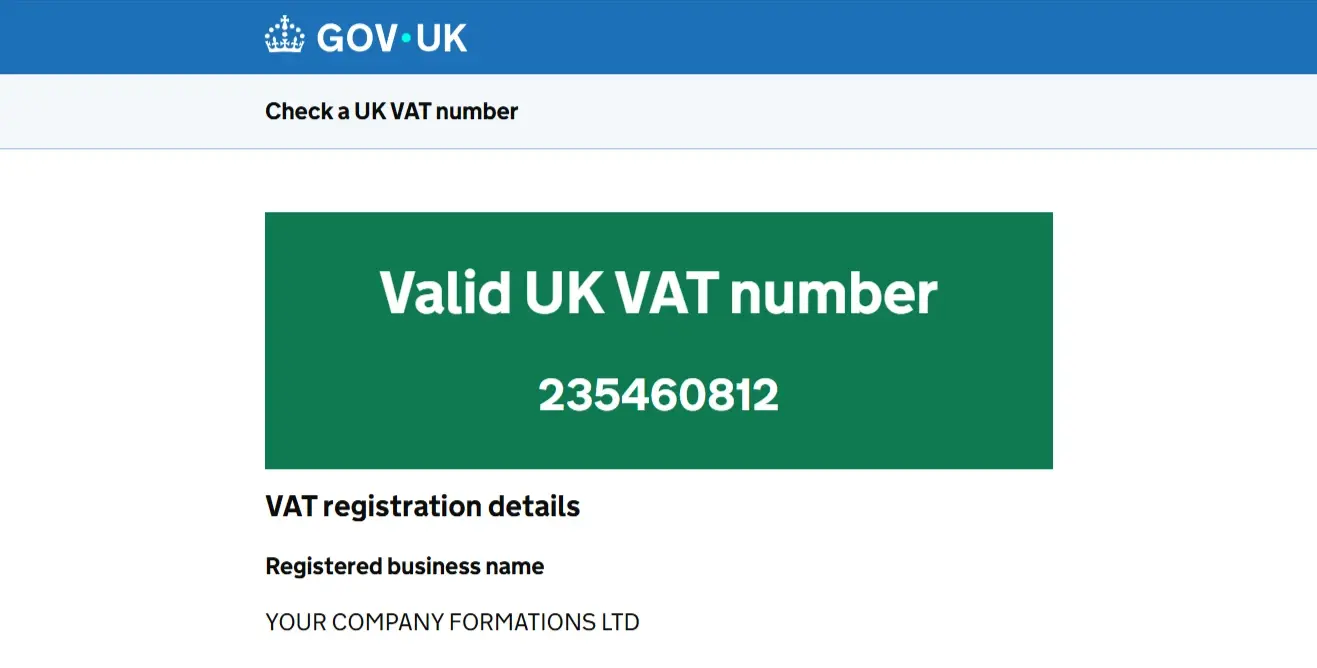
We tested the GOV.UK checker using Your Company Formations’ VAT number. After entering the number and running the check, the service confirmed it as a valid UK VAT number and displayed the registered business name, YOUR COMPANY FORMATIONS LTD.
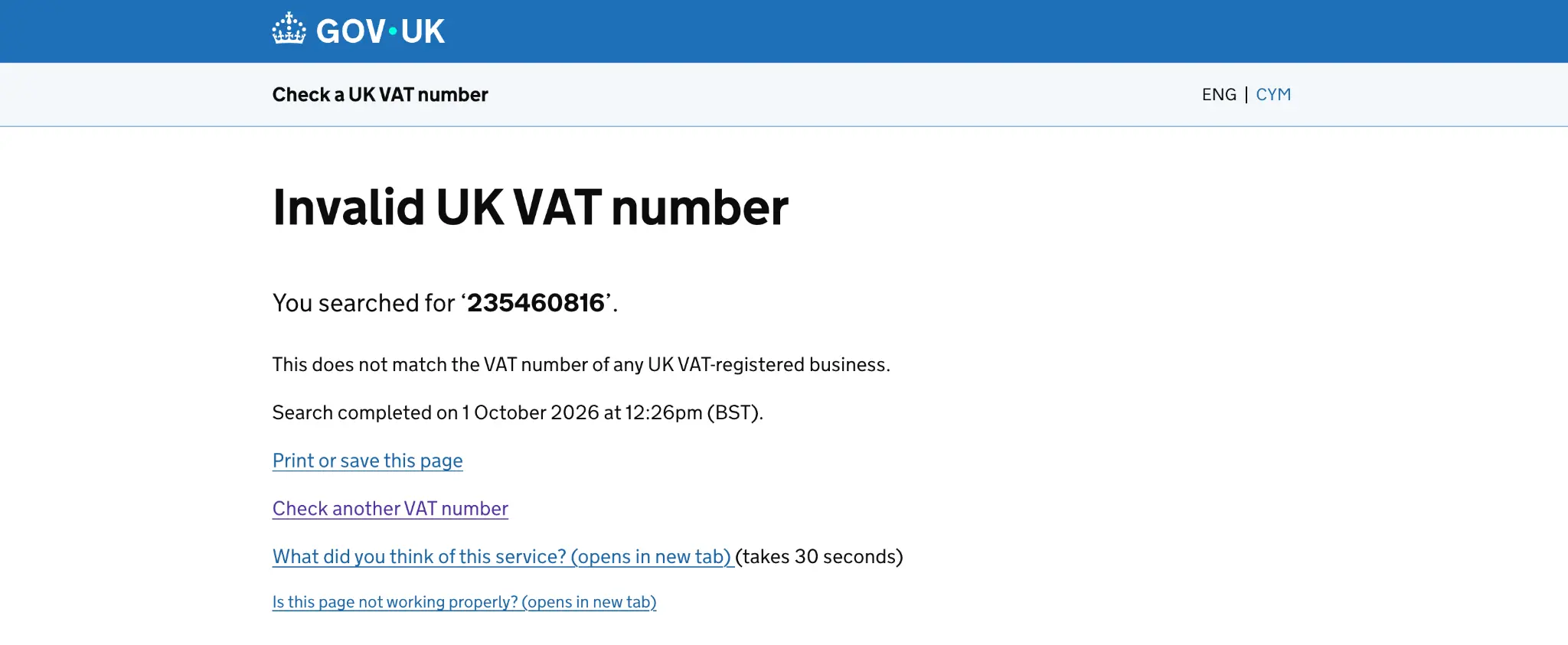
Next, we changed one digit in the VAT number while keeping the correct nine-digit format and checked it again. GOV.UK returned the altered VAT number as invalid, showing why it is worth checking the number you have been given carefully before relying on it for a supplier. HMRC confirms that invalid UK VAT registrations are returned as “invalid” by the checker.
What you’ll see in results: Working registrations show the business’s registered name and address, letting you compare this with invoices, contracts, or letters. If you are VAT-registered yourself, you can also use the same service to prove when you checked a number, enter your own VAT number and GOV.UK gives you a reference for the check.UK gives you a reference for the check. Keep that reference with the invoice.
Service limits to know:
- You can’t search by company name – you need the exact VAT number
- You cannot use the service to check a number that is still being processed: GOV.UK says you cannot use it if you have already applied to register for VAT and are waiting to hear back from HMRC.
- The system only covers UK VAT numbers (EU numbers need different systems)
- Sometimes maintenance breaks can temporarily stop the service
The checker also works in Welsh if needed. For businesses checking lots of VAT numbers, HMRC also publishes the checker as an API for businesses that want to build the check into their own systems.
Find a Company’s VAT Number by Name
You can’t search HMRC systems by company name, but you can find VAT numbers on business invoices, official websites, letterheads, and by asking suppliers for VAT registration certificates directly.
Main sources for VAT numbers:
- Business invoices – VAT numbers must appear on all invoices from registered businesses
- Company websites – check footer sections where legal information usually appears
- Business cards, letterheads, and marketing materials
- Contracts and price quotes
- Official business letters
Online marketplaces show VAT information: Many online marketplaces show a seller’s VAT details on the seller page. Check the seller information sections when dealing with online suppliers.
Direct approaches that work: Contact the company directly and ask for their VAT number. Most legitimate businesses give this information easily since they must show it on business documents anyway.
Ask for official VAT registration certificates for new business relationships. This gives you verified paperwork for audit trails and checking records.
Double-check for legitimacy: Use Companies House search to check business legitimacy alongside VAT checks. While VAT numbers and company registration numbers work separately, both systems help build a complete picture of business credibility.
When you can’t find a supplier’s VAT number through normal means, consider whether they meet the registration limit or if you need different suppliers who can provide proper paperwork.
EU Countries (& Northern Ireland) VAT Number Validation Through VIES
Use the EU’s VAT Information Exchange System (VIES) at ec.europa.eu/taxation_customs/vies/ to check VAT numbers from any of the 27 EU member states – essential for cross-border business deals post-Brexit.
How VIES works: VIES works as a real-time search engine that checks national VAT databases across all EU countries, plus Northern Ireland, for goods deals. Type in the complete VAT number, including country code, and you’ll get “valid” or “invalid” answers with basic business information where data protection laws allow.
Post-Brexit changes affect UK businesses: GB VAT numbers are not validated through VIES. Only Northern Ireland businesses trading under the protocol use the XI prefix, and those numbers can be checked on VIES. UK VAT numbers now show “invalid” when checked through VIES, while EU numbers can’t be checked through HMRC systems. You need separate checking systems for UK and EU partners.
As you look up the numbers, it is important to note that EU VAT number styles vary by country:
- German numbers: DE123456789 (9 digits)
- French numbers: 11 characters after FR, which may include letters in the first two positions (any except O or I).
- Dutch numbers: NL123456789B01 (9 digits, ‘B’, 2 digits)
- Swedish numbers: SE123456789012 (12 digits)
- Austrian numbers: ATU12345678 (always start with ‘U’)
Important for cross-border deals: For goods supplied from Northern Ireland to a VAT-registered EU customer, a valid EU VAT number is one of the conditions for zero rating, alongside removal of the goods and an EC Sales List. Businesses in Great Britain export to the EU under different rules. Keep checking records with reference numbers where available – these provide audit trail evidence for HMRC compliance reviews.
Northern Ireland keeps special VIES access for goods under the NI Protocol, but services follow different rules. The European Commission manages VIES, and information sharing stays limited due to GDPR restrictions.
Also Read: EORI Number UK
What to Do When VAT Number Checking Fails
Step-by-step troubleshooting prevents compliance delays when VAT searches fail – check input accuracy, verify system status, and keep detailed records of all checking attempts.
Start with input accuracy checks:
- Look for typing mistakes, missing digits, or wrong country codes
- Remove spaces, dashes, or special characters from the number
- Make sure country codes match the business location
- Try both with and without country prefixes (GB123456789 vs 123456789)
Check system status when searches fail: VIES shows maintenance schedules and error messages like “MS_MAX_CONCURRENT_REQ”, meaning system overload. HMRC service status updates appear on gov.uk during planned maintenance periods.
Other checking methods:
- Call HMRC VAT helpline on 0300 200 3700 for phone checking
- Try different web browsers or internet connections
- Use the system via mobile phone
- Wait 24 hours for potential database updates
- Contact national tax authorities directly for EU numbers when VIES fails
Record everything for compliance: Take screenshots of all checking attempts, note specific error messages, record other checking methods used, and keep timestamped records. This paperwork provides defensive evidence if checking problems contribute to compliance issues later.
When businesses can’t provide VAT numbers: Ask for VAT registration certificates directly, check whether they meet registration limits, consider other suppliers with working registration, and factor VAT implications into your pricing decisions. Keep audit trails showing attempts to get VAT numbers for HMRC compliance demonstration.
Legal Requirements for VAT Number Checking
UK businesses must show VAT numbers on all business documents and check customer VAT status for business-to-business deals.
Legal display requirements: The legal requirement is narrower than people think: your name, address and VAT number must be on every VAT invoice you issue. Quotes, orders and receipts are not covered by that rule.
Checking requirements for business transactions: You must hold a valid EU VAT number for your customer before zero-rating a supply from Northern Ireland to the EU, and check it again regularly. This protects you from getting caught up in fraud schemes and ensures you apply the correct VAT rate to each transaction.
Due diligence requirements under HMRC Notice 726: You could be made liable for the unpaid VAT of another VAT-registered business when you buy or sell specified goods, including computers, phones, and electronic equipment. HMRC does not expect you to go beyond what is reasonable, but it does expect you to make a judgement on the integrity of your supply chain and the suppliers, customers, and goods within it, and it cannot tell you exactly what checks to make. The Kittel principle allows HMRC to deny input tax recovery when businesses “knew or should have known” of supply chain fraud. Enhanced due diligence, proper paperwork, and immediate fraud reporting to HMRC (Fraud Hotline: 0800 788 887) provide essential protection against these risks.
Record-keeping requirements: Keep VAT checking paperwork for a minimum of 6 years, including screenshots of checking results, reference numbers proving checking timing, risk assessment outcomes, and due diligence procedures followed. Making Tax Digital requirements require electronic record-keeping with secure backup and audit trail maintenance.
Cloud accounting software such as Xero keeps those six years of invoices and VAT records in the digital form Making Tax Digital already requires.
Also read: How to Check if a Company Is Legit: Complete Guide
Next Steps for VAT Compliance
Mastering VAT number checking protects your business from fraud exposure, ensures HMRC compliance, and enables efficient trading relationships. Whether you need to register for VAT yourself or check supplier credentials, having proper systems in place saves time and prevents costly mistakes.
For ongoing checking needs: Set up automated checking workflows, keep strong audit trails, and stay updated with changing regulations. Regular staff training and professional advisory support for complex scenarios help you stay compliant while minimising checking burdens.
If you check supplier VAT numbers regularly and still keep the evidence in spreadsheets, do the check free on GOV.UK and keep the invoices and VAT records in Xero.
| Xero | Do it yourself with GOV.UK | |
|---|---|---|
| Checking a VAT number | Not what it is for – use GOV.UK’s checker. | Free. Confirms whether a UK VAT number is valid and the name and address it is registered to. |
| Proving when you checked | Keep the GOV.UK reference against the invoice in Xero. | Free, if you are VAT-registered: GOV.UK gives you a reference for the check. |
| Keeping six years of VAT records | Invoices, bank feeds and VAT records kept digitally in one place. Listed by HMRC as Making Tax Digital software for VAT. | You must keep VAT records for at least six years, and under Making Tax Digital some of them must be kept digitally in compatible software – you supply the software. |
| Invoices that carry your VAT number | Invoices are generated with your VAT number, name and address on them. | You format every VAT invoice yourself with the supplier name, address and VAT number HMRC requires. |
| Who it suits | A VAT-registered business that invoices and checks suppliers every month. | A one-off check, or a business happy to run its own records. |
| Through our link | Xero’s referral offer for new customers, shown on the sign-up page, plus a 30-day free trial. No promo code needed. | Nothing to claim. The checker is the same for everyone. |
| Claim Your Xero Offer |





How can I check the validity of a company’s VAT number for a potential fraud if I haven’t got a VAT number myself (as is required by your form) because I am checking as a customer?
Hi Barry. There is no official service that searches by company name – HMRC’s checker at gov.uk/check-uk-vat-number works from the number, and anyone can use it to see whether a number is valid and whose it is. To get the number itself, look at the company’s invoices or website or ask them directly.